The program covers UX research, information architecture, UI and Figma workflows. Content moves from brief to prototypes and a basic UI Kit.
Language of course:
Ukrainian
Format of the event:
Online
Add to collection
you haven't created a collection yet
Add Collection
Course overview
Description generated based on course syllabus and open data.
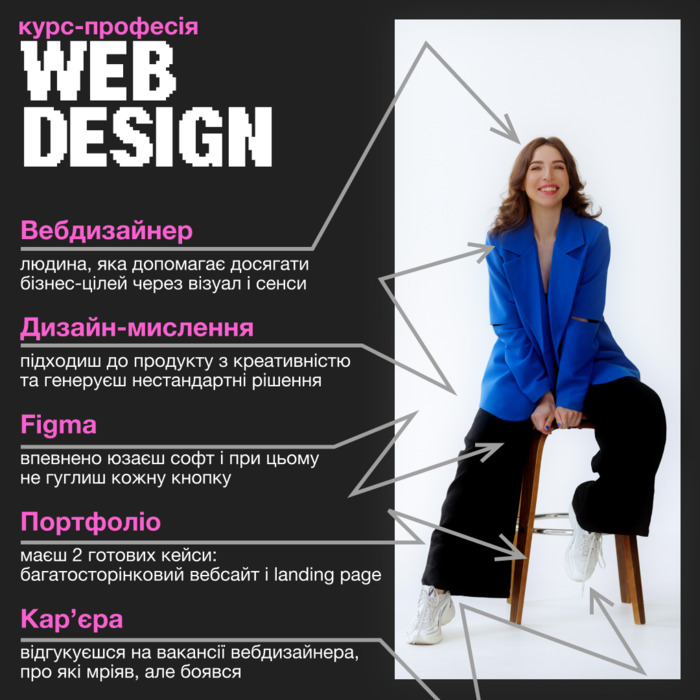
WEB DESIGN: a web design structure from brief to UI
The course systematizes web design: briefing, UX research, sitemap, copy, Figma prototyping, composition, typography, color, references, photo/graphics, mobile patterns and a UI Kit.
About the lecturer (web design practice)
- Olya Varchenko, 7+ years in web design and UX/UI.
- Experience: League Design Agency, ISD Group.
- Focus: unconventional site structures, deep narratives for e‑commerce and cloud services.
- Case: IoT visualization with 3D and AR for Cavli Wireless.
Who WEB DESIGN in Figma fits / who it does not
Suitable for
- Career switchers: a baseline web design frame to enter UX/UI and Figma.
- Junior web designers: 360° knowledge ordering and practice of alternative approaches.
- Graphic designers/illustrators/developers: broaden skills in web design and interface creation.
Not suitable for
- Those expecting theory only without hands‑on Figma tasks.
- Those seeking coding/markup only without UX/UI.
- Those expecting instant results or employment guarantees.
Problem → outcome in WEB DESIGN (UX/UI and Figma)
- Problem: unclear brief and goals. Outcome: structured brief, follow‑up business questions, measurable tasks.
- Problem: vague audience. Outcome: proto‑persona and a brand model by framework.
- Problem: scattered references. Outcome: curated reference library and competitor/best‑practice analysis.
- Problem: messy navigation. Outcome: sitemap, clear value propositions and base copy.
- Problem: hard to visualize. Outcome: wireframes, prototypes and flow checks.
- Problem: inconsistent UI. Outcome: composition, grid, typography, color, UI Kit and mobile adaptation.
Comparison with alternatives in web design
- Self‑learning: flexible but time‑consuming curation; risk of UX/UI gaps.
- University: strong fundamentals but long timeline and less Figma practice.
- Short tutorials: isolated skills without product architecture.
- This program: sequential path from research to UI Kit, one coherent web design methodology, hands‑on tasks in Figma.
Outcomes of working through the web design materials
- UX artifacts: brief, research, proto‑persona, category and competitor insights.
- Information architecture: sitemap, navigation, value propositions and base copy.
- UI practice: composition, grid, typography, color, and photo/graphics work.
- Figma prototypes: wireframes, interactions, mobile adaptations.
- UI Kit: components, states, interface tokens.
- Portfolio examples: a multi‑page website and a landing page.
WEB DESIGN syllabus: UX/UI and Figma
UX block
- Project start: brief, business follow‑ups.
- Research: audience, proto‑persona, brand model.
- Market: category scan, competitors, best practices.
- Structure: sitemap, copy, value propositions.
- Prototyping: wireframes, linking, hypothesis checks.
UI block
- Composition and grid.
- Typography.
- Color and accessibility.
- References and design library.
- Photo/illustration and poster exercise.
- Implementation, key UI principles, UI Kit, mobile.
Evaluation
Only authorized users can leave reviews and rate
Log in »



.png)